
GitHub Actions : une recette automatique pour ton projet
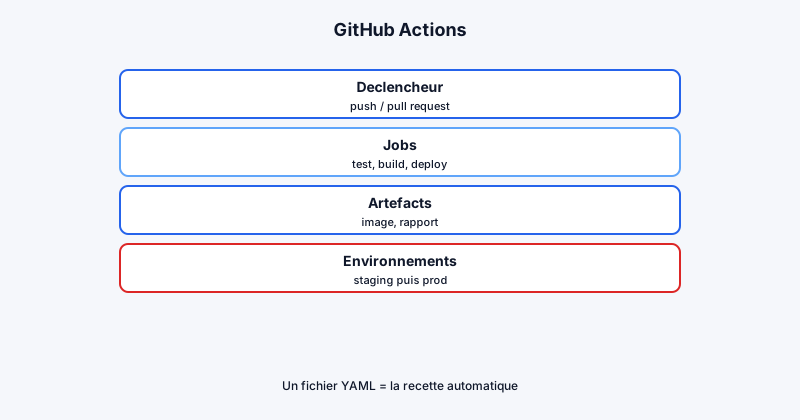
L'objectif ici : te donner un workflow compréhensible, pas un YAML magique copié-collé sans comprendre. On part sur une API type Node/TypeScript, mais les principes s'appliquent à n'importe quelle stack conteneurisée : lint, tests, build d'image Docker, push vers un registry, déploiement Kubernetes, vérification du rollout.
Structure recommandée : deux workflows
Resiste à la tentation d'un seul fichier monolithique. Deux workflows séparent les responsabilités :
ci.yml: checks sur chaque pull request (lint, typecheck, tests unitaires)deploy.yml: build d'image, push registry, déploiement surmainou sur tag
Avantage : une PR ne déclenche pas un déploiement, et le pipeline de déploiement reste court et lisible. Les checks rapides sur PR donnent un feedback en quelques minutes.
Exemple ci.yml pour les pull requests
Sur chaque PR, lance uniquement les vérifications sans toucher à l'infra :
name: CI

on:
  pull_request:
    branches: [ main ]

jobs:
  checks:
    runs-on: ubuntu-latest
    steps:
      - uses: actions/checkout@v4
      - uses: actions/setup-node@v4
        with:
          node-version: "22"
          cache: "npm"
      - run: npm ci
      - run: npm run lint
      - run: npm run typecheck
      - run: npm test
Ce workflow est court, reproductible localement (npm ci && npm test), et bloque les merges si un check échoue. Tu peux ajouter un job parallèle pour le build Docker sans push (push: false) afin de vérifier que le Dockerfile compile bien.
Déclencheurs et permissions
GitHub Actions réagit à des événements configurables dans on: :
pushsurmain: déclenche le déploiementpull_request: lance les checks sans déployerworkflow_dispatch: déclenchement manuel depuis l'interface GitHub
Limite les permissions du GITHUB_TOKEN au strict nécessaire (contents: read, packages: write pour GHCR). Principe du moindre privilège : si un job n'a pas besoin d'écrire, ne lui donne pas le droit.
Exemple deploy.yml complet mais lisible
name: Deploy

on:
  push:
    branches: [ main ]

jobs:
  deploy:
    runs-on: ubuntu-latest

    steps:
      - name: Checkout
        uses: actions/checkout@v4

      - name: Set up Node
        uses: actions/setup-node@v4
        with:
          node-version: "22"
          cache: "npm"

      - name: Install deps
        run: npm ci

      - name: Lint + typecheck + tests
        run: |
          npm run lint
          npm run typecheck
          npm test

      - name: Login registry
        uses: docker/login-action@v3
        with:
          registry: ghcr.io
          username: ${{ github.actor }}
          password: ${{ secrets.GITHUB_TOKEN }}

      - name: Build and push image
        uses: docker/build-push-action@v5
        with:
          context: .
          push: true
          tags: ghcr.io/ton-org/ton-api:${{ github.sha }}

      - name: Setup kubectl
        uses: azure/setup-kubectl@v4
        with:
          version: "v1.29.0"

      - name: Write kubeconfig
        run: echo "${KUBECONFIG_B64}" | base64 -d > kubeconfig.yml
        env:
          KUBECONFIG_B64: ${{ secrets.KUBECONFIG_B64 }}

      - name: Deploy
        env:
          KUBECONFIG: ${{ github.workspace }}/kubeconfig.yml
        run: |
          kubectl set image deployment/ton-api api=ghcr.io/ton-org/ton-api:${{ github.sha }}
          kubectl rollout status deployment/ton-api
Points clés :
- L'image est taguée avec
${{ github.sha }}: traçabilité commit → déploiement kubectl rollout statusattend la fin du déploiement : un pipeline vert = un déploiement réellement terminé- Les secrets (
KUBECONFIG_B64) sont stockés dans Settings → Secrets, jamais en clair dans le repo
GitHub Environments : protéger la production
Pour aller au-delà du staging, utilise les Environments GitHub :
staging: déploiement automatique sur pushmainproduction: déploiement manuel avec approbation requise
Configure des protection rules (reviewers obligatoires, délai d'attente) pour éviter les mises en prod accidentelles. Chaque environment peut avoir ses propres secrets (KUBECONFIG_PROD_B64 vs KUBECONFIG_STAGING_B64).
Actions réutilisables et composite actions
Quand tu répètes les mêmes steps dans plusieurs workflows, extrais-les :
- Actions du marketplace :
actions/checkout,docker/build-push-action,azure/setup-kubectl - Composite actions maison : un dossier
.github/actions/deploy-k8s/action.ymlqui encapsule kubectl + rollout status
Ça réduit la duplication et centralise les mises à jour (changement de version kubectl à un seul endroit).
Améliorations pour la production
Le workflow ci-dessus est un bon point de départ. En production, ajoute :
- Tags sémantiques (
1.2.3) en plus du SHA, déclenchés par un tag Git - Scan d'image avec Trivy (
aquasecurity/trivy-action) avant le push ou après - Promotion staging → prod : pas de déploiement direct en prod depuis
main - Notifications Slack ou email en cas d'échec (
if: failure()) - Rollback automatique si le healthcheck post-déploiement échoue
- Cache Docker via
cache-from/cache-topour accélérer les builds
Pièges courants à éviter
- Utiliser
latestcomme seul tag d'image (impossible de savoir ce qui tourne) - Déployer sans tests (un pipeline rapide qui casse la prod n'est pas un gain)
- Stocker des secrets dans le YAML ou les logs (
echo $SECRETmasque mal) - Oublier
rollout status(le job passe au vert pendant que le déploiement échoue silencieusement)
Conclusion
GitHub Actions permet de construire un pipeline clair : checks sur PR, build d'image versionnée, déploiement Kubernetes vérifié. Sépare tes workflows, tag avec le SHA, protège la prod avec les Environments. Pour la même logique côté GitLab, consulte le guide GitLab CI : pipeline complet.